/ trust
How Gig Keeps Scam Messages Out of Your Inbox
A stranger's first message is how most work on Gig begins, so a filter can't treat strangers as the problem. The new Suspicious folder looks at what an account has done instead, and keeps those messages quiet until you choose to look.

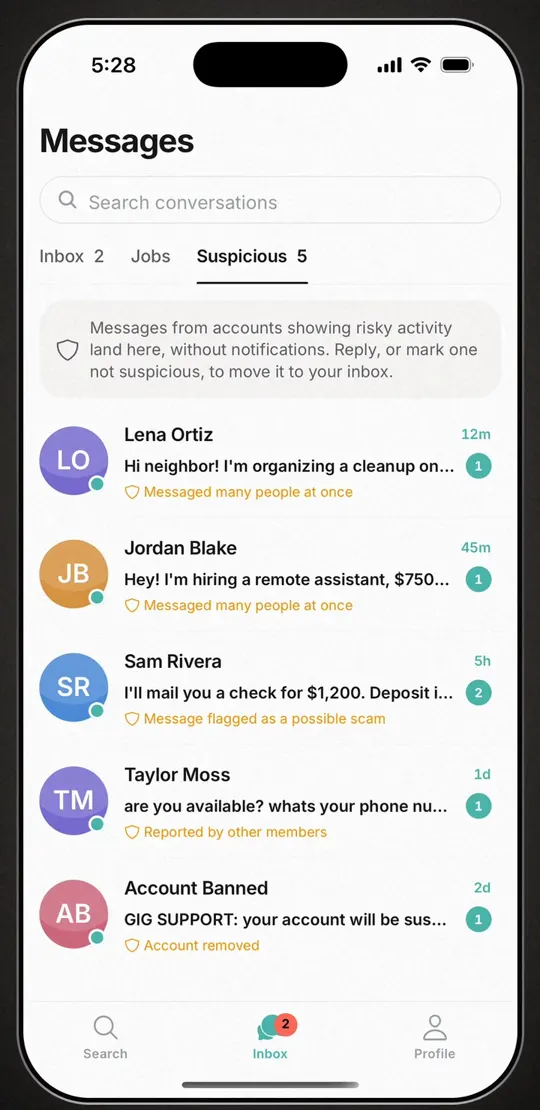
The short answer: Messages on Gig now open on three tabs: Inbox, Jobs and Suspicious. A conversation lands in Suspicious only when someone you've never replied to writes first and their account has a record of risky behavior on Gig, such as a message the scam screening flagged, reports from other members, or messaging many people at once. Those conversations don't send a notification or add to your unread badge. Each one shows why it's there, and one tap on Not suspicious moves it back to your Inbox. A new account, an empty profile or a mention of Venmo is never a reason on its own.
This sits on top of the protections in Is Gig safe?: sign-in, two-way ratings, and block and report in every chat. It doesn't replace any of them, and it isn't a background check.
Why the filter can't punish strangers
On most apps a message from someone you don't know is noise. On Gig it's the job. A customer who downloaded the app ten minutes ago has no photo, no reviews and no history, and their first message to a cleaner or a handyman is exactly the message that cleaner wants. A filter that treated "new" as "risky" would bury the people pros signed up to hear from. So the folder ignores what a profile is missing and looks at the tracks scammers leave instead.
What puts a conversation in Suspicious
Two things have to be true. The conversation is unsolicited: they wrote first and you haven't replied. And the account trips at least one of the signals below. The right-hand column is the exact label you'll see under the message preview.
| What the account did | What the row says |
|---|---|
| The scam screening flagged a message they sent you | Message flagged as a possible scam |
| Their messages to other people were flagged | Flagged in other chats |
| Other members reported them for a scam or a fake profile | Reported by other members |
| Several people blocked them | Blocked by several members |
| They started conversations with many people at once | Messaged many people at once |
| The account is connected to one Gig removed | Linked to a removed account |
| Gig's team is reviewing it, or it's suspended | Account under review · Account suspended |
| Gig removed the account | Account removed |
We don't publish the cut-offs behind "several" or "many." A filter whose numbers are public is a filter people learn to stay just under.
What never sends a conversation there
- A conversation you've replied to. Once you've answered, it's your conversation and it stays in your Inbox. If that account later draws flags or reports, the chat gets a warning at the top instead of moving.
- Someone you've rated, or who rated you. A finished job says more than any pattern.
- Job-request chats. When a customer asks for quotes, the pros who answer are replying to that request, so a chat between the two is exempt. More on that in how Get quotes works.
- Anyone you've marked Not suspicious.
And these are never signals on their own: a brand-new account, no profile photo, no listings, a phone number in the message, a copy-pasted quote request, or "I can Venmo you after." Paying the person directly is how Gig works, so Venmo, Cash App, Zelle and PayPal come up in ordinary messages all day.
Quiet by design
A conversation in Suspicious doesn't buzz your phone, and it doesn't count toward the unread badge on the Inbox icon. The Suspicious tab shows its own count when you open Messages, so you can look when it suits you.
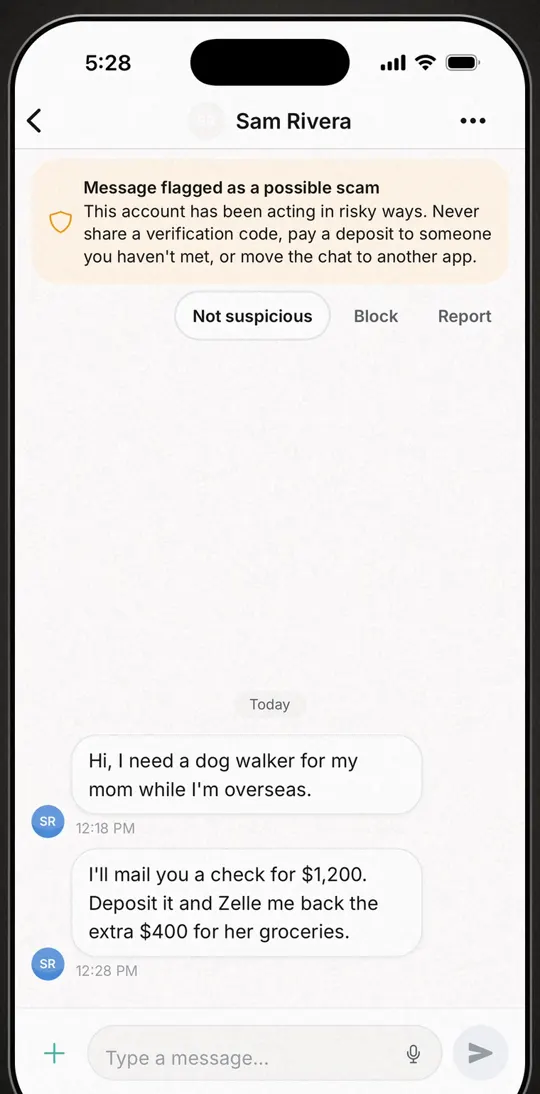
Open one and the reason sits at the top of the chat with a plain warning: "Never share a verification code, pay a deposit to someone you haven't met, or move the chat to another app." Under it are three buttons: Not suspicious, Block and Report. If Gig has already removed the account, there's no one left to answer, and the chat says so.
Know them? One tap
Any filter gets some calls wrong. A neighbor organizing a street cleanup might message half the block in an afternoon, and that looks like a blast. Tap Not suspicious and the conversation moves to your Inbox with a short "Moved to your inbox" confirmation. Replying does the same. The folder sorts. You decide.
The scams it's built around
Gig screens chat messages that match common scam patterns, reading each one with the few messages before it, so "Venmo me after the job" isn't mistaken for a con. A flagged message goes to a person on our team, and the screening never bans anyone on its own. These are the pitches local pros see most:
- The overpayment. "I'll mail you a check for more than the job. Deposit it and send back the difference." The check bounces after your money has gone. The FTC's guide to fake check scams (opens in a new tab) walks through it, and it has warned childcare providers (opens in a new tab) about the version aimed at caregivers.
- The verification code. "I just need to make sure you're real. Read me the code I texted you." That code unlocks one of your accounts. The FTC's rule is short: anyone who asks for your verification code is a scammer (opens in a new tab).
- Gift cards, crypto or a wire. No real customer pays that way. See the FTC on gift card scams (opens in a new tab).
- "Text me on WhatsApp instead." In a first message, that's a request to leave the place where the screening, the reasons and the Report button live.
- A deposit before you've met. The hiring-side version: someone you haven't met wants money up front to "hold the date." Pay once the work has started, not before.
Strangers are the point of a local marketplace. Scam patterns are not. The folder looks at what accounts do, not how new they are.
What it doesn't do
It catches patterns, not every scammer. A scam account nobody has reported, blocked or flagged yet can land in your Inbox like anyone else, so a message there is not a certificate that the sender is safe. The folder doesn't check IDs, licenses or criminal records either. Nothing on Gig does, and the safety post says so plainly.
Gig also never holds the money. Payments go straight between you and the other person, which is why Gig takes 0%, and also why Gig can't reverse one. If money has already moved, contact your bank or the payment app first, then report it at ReportFraud.ftc.gov (opens in a new tab). Inside Gig, tap Report and choose "Scam or fraud." Reports are one of the signals the folder uses for everyone else.
Don't see the tab? The Suspicious folder is in the current version of Gig on iPhone and Android. If Messages shows only Inbox and Jobs, update the app.
Frequently asked
What is the Suspicious folder in Gig?
It's a tab under Messages, next to Inbox and Jobs. A conversation lands there when someone you've never replied to writes first and their account has a record of risky behavior on Gig, such as a message flagged by the scam screening, reports from other members, or messaging many people at once. Those conversations don't send notifications or count toward your unread badge, and each one shows the reason it's there.
Will a new customer's message end up in Suspicious?
Not for being new. The folder never counts a new account, a missing photo, an empty profile or a mention of a payment app against anyone. It looks only at what an account has done on Gig, so a first-time customer's message goes to your Inbox like any other.
How do I move a conversation out of Suspicious?
Open it and tap Not suspicious, or reply. Either one moves the conversation to your Inbox. If the account later draws more flags or reports, you'll see a warning at the top of the chat, but the conversation stays in your Inbox.
Does Gig read my messages?
Gig screens chat messages that match common scam patterns, using an AI model from Anthropic, with the few messages before each one for context. Anthropic's terms don't allow it to train its models on that text. A flagged message goes to a person on Gig's team for review, and the screening never bans an account on its own.
Where this fits
The Suspicious folder is one layer. The rest is in Is Gig safe? If you're a pro waiting on that first real message, how to get your first local clients covers getting found, and a shareable profile link lets a customer see your services and reviews before they write.