/ get-clients
QR Code Business Cards That Open Your Gig Profile
A lot of local work still changes hands as a card on a fridge. You can now design one in the Gig app and have it printed and shipped. The back carries a QR code that opens your profile, so the next person gets your reviews, not just a phone number.

The short answer: in Gig, open the Profile tab and tap Business cards ("Design your own and get them shipped to you"). Pick a layout and colors, check the details Gig fills in from your profile, and leave the QR code on. Then tap Order cards, choose 50, 100 or 250, and pay on Gig's payment page with Apple Pay, Google Pay or a card. The cards are printed on both sides and shipped to the address you pay with, and the total for that address is on screen before you pay.
The reason to bother is the back. An ordinary card is a name and a number, so whoever finds it on a neighbor's fridge takes you on trust. A Gig card's code opens your services, prices and reviews.
Where it is, and what you design
It's on your own Profile tab, under Programs. The screen opens on a live preview of your card; tap it to flip between front and back. The preview in the app, the card shown on the payment page and the file that goes to the printer are all drawn from the same layout, so what you see is what prints.
- Layout. Classic (name left, round photo right), Centered (everything down the middle, contact details in a row along the bottom) or Split (a solid panel with your photo down one side).
- Colors. A set of ready-made color schemes, or Custom, where you pick the Background, Text and Accent yourself.
- Front of the card. Name, "What you do" (for example, "House cleaning"), and up to five contact lines, each with a matching icon. A new card is filled in from your profile; a hidden Apple relay email is left off.
- Photo or logo. Your profile photo by default, or your initials. Upload a JPG or PNG instead, show it as a Circle or As is for a logo, and tap Adjust to drag and pinch it into place.
The editor warns you when something will print badly: text that's hard to read on the background, a line too long to fit, a photo too small to print sharply. Hebrew and Arabic cards mirror to read right to left. Chinese, Japanese and Korean characters can't be printed yet, and the app says so before checkout.
The back: a QR code inside the Gig icon
The back says "Find me on Gig" with "Scan to see my reviews and message me" underneath. You can change both. The switch below them is QR code to my Gig profile, and the code is built into the Gig app icon rather than printed next to it. Anyone who scans it lands on your profile page in their phone's browser: your services and prices, your rating, and a way to reach you. They don't need the app to see it. That page is the same one you get when you share your Gig profile as a link.
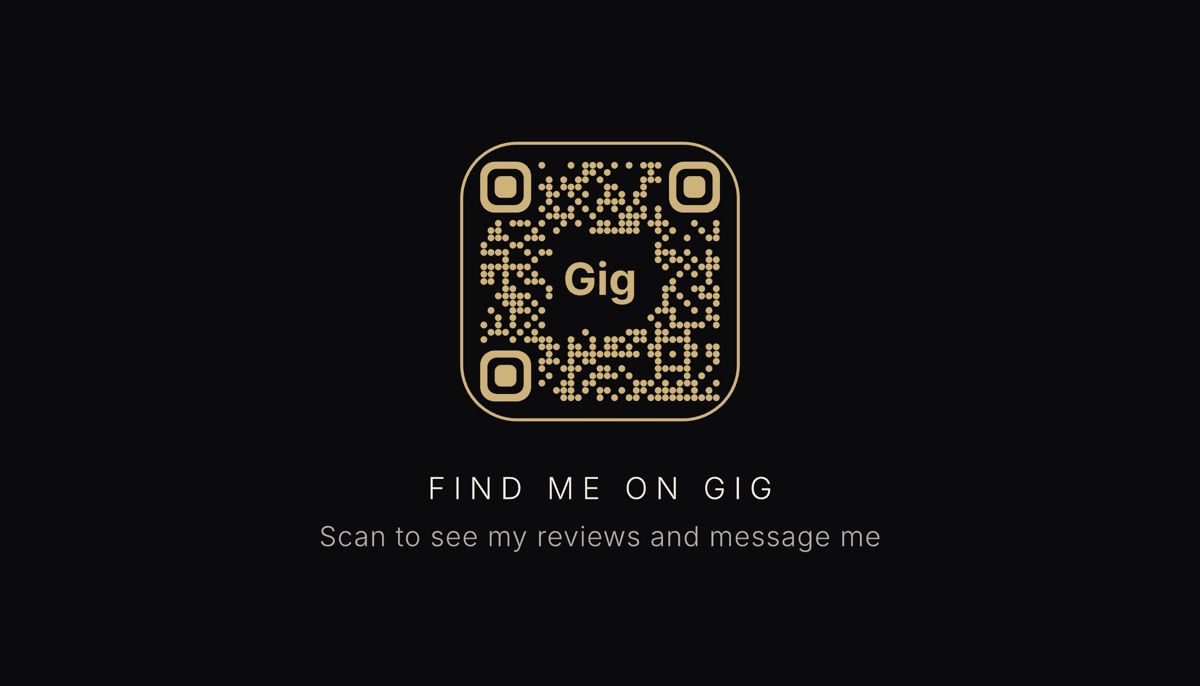
An iPhone camera reads the light-on-dark version, but some older Android scanner apps don't, so scan the preview from a second phone before you order. Don't want a code? Switch it off, and Your logo takes its place.
Paper, size and price
| Detail | What you get |
|---|---|
| Size | Standard US business card, 3.5 × 2 in, landscape |
| Paper | 350gsm coated silk, printed in color on both sides |
| Packs | 50, 100 or 250 cards |
| Payment | Apple Pay, Google Pay or a card, in US dollars, on Gig's payment page |
| Shipping | Priced for your address, total shown before you pay |
The order sheet lists each pack's price per card and its price "+ shipping". Shipping isn't a flat number: the payment page works it out from the address in your Apple Pay or Google Pay sheet, or the one you type with a card, then shows the shipping, the total and an estimated delivery window before you confirm. You enter the address once, and if checkout can't ship there, it says so before anything is charged.
The payment opens in a browser sheet inside the app instead of as an in-app purchase. That isn't a workaround: Apple's App Review Guidelines (opens in a new tab) require apps to use a payment method other than in-app purchase for physical goods, and Google Play has the same rule. Card details go to Stripe, which processes the payment, and Gig never receives your full card number.
After you pay
Gelato, Gig's print partner, prints and ships the cards. Under Your orders the status moves from "Getting it ready" through "Printing" to "Shipped" and "Delivered", a Track button appears once there's a tracking link, and you get a notification when they ship.
A phone number on a card is a lead. A code that opens your reviews is a reference.
What it doesn't do
Cards are printed for you from the preview you approve, so they can't be returned, and Gig doesn't refund a change of mind or a typo you entered. Proofread the preview the way you'd proofread anything you're paying to print. If the cards arrive damaged, don't match the preview, or don't arrive at all, email support@rightimagedigital.com within 30 days of ordering and Gig will reprint them or refund you. Delivery times are estimates, and checkout ships only to the countries it offers.
What's on the card is your responsibility: the details have to be accurate and the logo has to be yours to use. And the code only ever points at your profile. It stops working if you delete your account or your profile is removed.
A card also can't do the work of the profile behind it. A scan that lands on one vague listing with no price is wasted. One specific service, a real price and a couple of reviews turn a scan into a message; more on that in how to get your first local clients.
How a 0% app pays for itself
Gig takes no commission on your jobs and never touches the money between you and a customer, which raises a fair question: how does it make any? Partly by selling things people want. The card price covers printing and shipping plus a small margin for Gig. The longer version is in how Gig works without a commission.
Frequently asked
How do I order business cards on Gig?
Open the Profile tab and tap Business cards, under Programs. Pick a layout and colors, check your name, what you do and your contact lines, then tap Order cards. Choose 50, 100 or 250 cards and continue to payment. You pay with Apple Pay, Google Pay or a card, and the cards are printed on both sides and shipped to the address you pay with.
Where does the QR code on a Gig business card go?
It opens your Gig profile page: your services and prices, your reviews, and a way to message you. The person scanning it doesn't need the Gig app. The code stops working if you delete your account or your profile is removed.
How much do Gig business cards cost?
The order sheet shows each pack's price before shipping. Shipping depends on the address, so the payment page works it out from the address you pay with and shows the total, with an estimated delivery window, before you pay. Prices are in US dollars, and any sales tax is shown at checkout.
Can I return Gig business cards or get a refund?
Cards are printed to order from the preview you approve, so they can't be returned, and a change of mind or a typo isn't refunded. If they arrive damaged, don't match the preview, or don't arrive, email support@rightimagedigital.com within 30 days of ordering and Gig will reprint them or refund you.
Where the card leads
The card is the paper half. The same profile page works in a text or a bio, and sharing it as a link takes a tap. Still deciding what goes under "What you do"? Start with what service to offer, then how to price it.